If you have typed your own business name into Google and watched a competitor show up instead, you already know how frustrating this problem feels. Your business doesn’t appear on Google Maps for one of a handful of specific, fixable reasons, and almost none of them are mysterious once you know where to look.
This guide walks through why the Google Maps 3-pack keeps skipping past your listing and what you can do this week to change that. You will see the exact ranking mechanics Google uses, the common technical mistakes UK small businesses make, and a practical fix for each one.
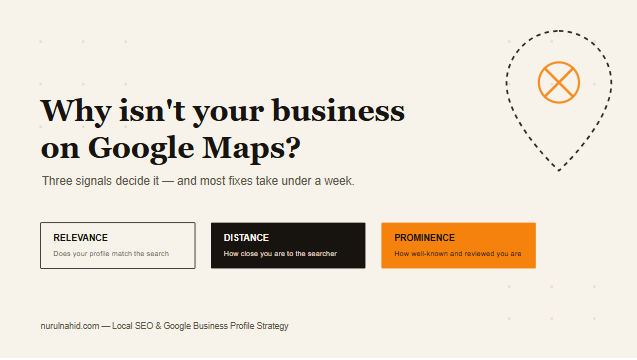
Local visibility on Google Maps is not luck. It is a set of signals Google checks and re-checks constantly, and businesses with a Google Business Profile that is fully optimised through professional local SEO services tend to solve this problem far faster than those guessing on their own.
The Real Reasons You Don’t Appear on Google Maps
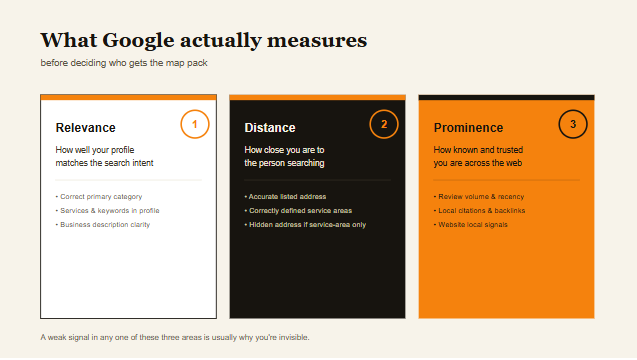
Before fixing anything, it helps to understand what Google is actually measuring when it decides who gets a spot in the map pack.
Google’s local ranking system leans on three pillars: relevance, distance, and prominence.
Relevance means how well your profile matches what someone searched for. Distance is exactly what it sounds like. Prominence measures how well-known and well-reviewed your business is across the web.
Most invisibility problems trace back to a weak signal in one of these three areas, so let’s break each one down.
Your Google Business Profile Was Never Verified
An unclaimed or unverified profile is the single most common reason a business is invisible on Maps. Google treats verification as a baseline trust signal, and Birdeye’s 2026 industry research reported that verification climbed to 76% of business profiles in 2025, up from 71% the previous year.
That gap matters more than it sounds. The same research found that verified listings generate meaningfully more website visits, along with double-digit increases in phone calls and direction requests, compared with unverified profiles.
If you have never received or completed a verification postcard, video call, or phone verification from Google, this is your starting point, not an optional extra.
Your Business Details Are Inconsistent Across the Web
Google cross-references your name, address, and phone number (your NAP) against directories, your website, and citation sources. Mismatched details confuse the algorithm and quietly suppress your ranking.
A slightly different suite number on Yell versus your website, or an old phone number still live on a directory, can be enough to hold you back.
This is one of the easiest fixes on this list, but it requires an actual audit rather than a guess, which is where a proper technical SEO audit typically uncovers issues business owners never knew existed.
You Picked the Wrong Primary Category
Your primary GBP category carries enormous weight in relevance scoring. A plumber who selects “Contractor” instead of “Plumber” is making Google work harder to understand what they actually do, and Google rewards specificity.
Check your category against exactly what a customer searching for you would type, not the broadest term that technically applies.
Your Profile Is Incomplete
Google openly rewards completeness. Profiles with fully filled-out attributes, hours, services, and photos get dramatically more engagement than sparse ones. Local SEO statistics platform Searchlab documented that fully completed profiles get seven times more clicks than incomplete profiles and 70% more in-store visits, citing Google’s own 2026 data.
An incomplete profile is not just missing information. It is a missed opportunity that Google actively penalises in ranking terms.
Once your profile is fully built out, the next issue to check is whether your business even has enough trust signals to be considered prominent.
Prominence Signals Google Checks Before Ranking You
Prominence is where reputation, reviews, and mentions across the web come into play, and it is often the piece UK businesses neglect the longest.
You Don’t Have Enough Recent Reviews
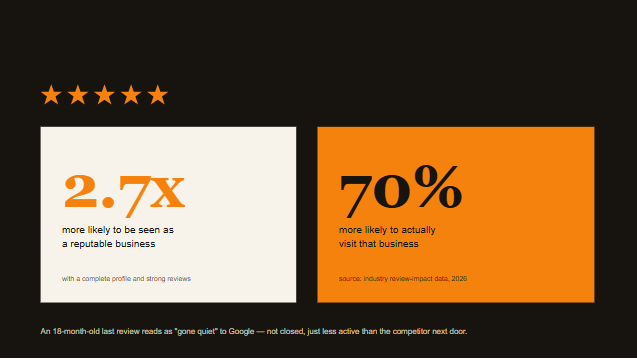
Review volume, recency, and rating all factor into local ranking. Listings with a strong review profile see a measurable advantage, and industry data compiled by Resourcera shows a complete profile with strong reviews makes customers 2.7 times more likely to view a business as reputable and 70% more likely to visit it.
If your last review is from eighteen months ago, Google reads that as a business that may have gone quiet, not necessarily closed, but less active than a competitor collecting fresh reviews weekly.
Your Website Has Weak Local Signals
Google checks your website for consistency with your GBP listing, including your address in the footer, local schema markup, and location-specific content. A generic homepage with no borough, town, or postcode mentioned anywhere gives Google very little to connect back to your Maps listing.
You Have No Local Citations or Backlinks
Mentions of your business on other reputable local websites, from your local chamber of commerce to industry directories, act as votes of confidence. A business with zero citations outside its own website looks less established than one with a healthy citation footprint, and structured link building is one of the more overlooked levers here.
With relevance and prominence covered, distance is the one variable you genuinely cannot control, but you can influence how Google interprets it.
Why Distance Still Works Against You Even When You’re Local
Distance ranking is based on the searcher’s location relative to your listed address, but service-area businesses often misunderstand how this works.
If you serve a 20-mile radius from a home office and hide your address, which is a legitimate option for service-area businesses, you need to set your service areas correctly inside GBP or Google will guess, and it often guesses wrong.
Businesses that rank in the map pack consistently outperform those ranked lower on the page. BizIQ’s 2026 local search research found that businesses in the map pack receive 126% more traffic and 93% more calls, clicks, and direction requests than those ranked four through ten.
This is exactly why fixing distance-related setup issues is not a minor detail. It is often the difference between page one and total invisibility.
How to Fix Each Problem This Week
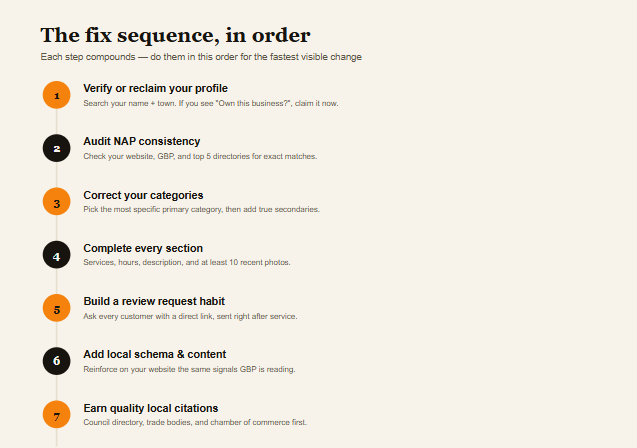
Here is the practical sequence, in the order that produces the fastest visible change.
Step one: verify or reclaim your profile. Search your business name plus your town on Google. If you see “Own this business?” you are unverified. Claim it through Google Business Profile Manager immediately.
Step two: audit your NAP consistency. Check your website footer, GBP listing, and top five directories, including Yell, Thomson Local, Bing Places, Facebook, and industry-specific directories, for exact matches.
Step three: correct your categories. Choose the most specific primary category, then add relevant secondary categories that genuinely apply to your services.
Step four: complete every section of your profile. Add services, products, business description, opening hours including special hours, and at least ten recent photos.
Step five: build a simple, compliant review request habit. Ask every customer, not just happy ones, using a direct link sent by text or email after service completion.
Step six: add local schema and location content to your website. This reinforces the same signals Google is reading from your GBP listing.
Step seven: earn a small number of quality local citations. Focus on relevance over volume, starting with your local council directory, trade bodies, and chamber of commerce.
Each of these steps compounds. None of them work in total isolation, which is why businesses that treat local visibility as a system rather than a checklist tend to see the fastest, most durable results.
What Happens After You Fix the Technical Issues
Once the mechanical problems are resolved, visibility becomes a matter of consistency rather than repair. Google rewards businesses that keep posting updates, responding to reviews, and refreshing photos on a rolling basis.
This is also the stage where many business owners underestimate how AI-driven search is reshaping the map pack itself. BizIQ’s platform research noted that Google’s AI systems now pull directly from GBP category tags, service listings, attributes, and review sentiment data to power AI-assisted local recommendations, so a thin profile does not just underperform in the traditional map pack, it gets skipped by AI Overviews too.
Businesses that treat their profile as a living asset rather than a one-time setup task are the ones still visible twelve months from now.
If you have worked through every step above and still cannot see movement, it is worth having a second set of eyes review your account. A local SEO audit and strategy session can usually pinpoint the exact blocker within the first thirty minutes, and you can book a meeting directly if you’d like that reviewed.
Businesses across the UK, from those researching a great SEO specialist in Nottingham to those comparing options for the best SEO specialist in Cardiff, face nearly identical Google Maps visibility issues, which is precisely why a systematic checklist approach works regardless of your industry or location.
How This Looks Different Across Business Types
The specific fix that matters most often depends heavily on what kind of business you run, so it helps to see how this plays out in practice.
Retail Shops and Storefronts
A physical shop with a fixed address usually struggles most with category selection and photo quality. Shoppers researching before a visit rely heavily on interior photos, so a shopfront with only an exterior image tends to underperform a competitor showing shelves, product displays, and genuine customer traffic.
Retail businesses also benefit disproportionately from accurate, current opening hours, since a large share of shopping-related searches happen with immediate visit intent rather than research intent days in advance.
Trades and Service-Area Businesses
Plumbers, electricians, and similar trades most commonly lose visibility through incorrect service area setup or an address that doesn’t match how they actually operate. If you work from home but serve a wide radius, hiding your address and defining service areas precisely is essential, not optional.
Review velocity matters enormously here too, since trade businesses often go weeks between jobs in a specific street or postcode, making consistent review collection the difference between staying visible and quietly fading from local results.
Restaurants and Hospitality
Hospitality businesses tend to suffer most from stale menus, missing photos of actual dishes, and inconsistent hours around bank holidays. Google increasingly surfaces menu items directly in search results, so a missing or outdated menu section actively costs visibility for specific dish-related searches.
Professional Services
Solicitors, accountants, and consultants often face the opposite problem: an overly generic category and a business description that reads like a legal disclaimer rather than a description a search engine, or a customer, can actually use to understand what they do.
Tools That Help You Diagnose the Problem Yourself
Before assuming the worst, it’s worth running a few free diagnostic checks to narrow down exactly where the issue sits.
Google’s own Business Profile performance dashboard, found within Google Business Profile Manager, shows how customers are currently finding and interacting with your listing, including a breakdown of direct versus discovery searches.
A simple incognito browser search for your business name plus your town, run from a device with location services enabled, shows you exactly what a real customer currently sees, which is often surprisingly different from what you assume based on your own regularly logged-in browsing.
Checking your listing against Google’s Support pages for suspension or policy violation notices can also quickly rule out or confirm whether a formal enforcement action, rather than a ranking issue, is the actual cause of your invisibility.
When the Problem Is a Suspension, Not Just Poor Ranking
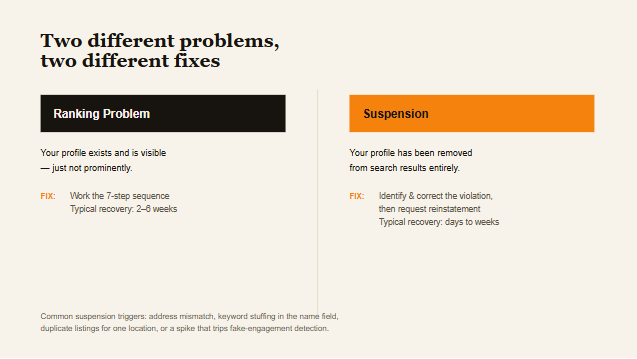
It’s worth distinguishing clearly between a ranking problem and an outright suspension, since the fixes are entirely different. A ranking problem means your profile exists and is visible, just not prominently. A suspension means your profile has been removed from search results entirely, usually due to a detected policy violation.
Common suspension triggers include a mismatch between your listed address and verifiable business presence, keyword stuffing in your business name field, operating multiple listings for the same physical location, or a spike in reviews that trips Google’s fake engagement detection systems.
If you suspect a suspension rather than a ranking issue, the recovery path involves identifying the specific violation, correcting it thoroughly, and submitting a reinstatement request through Google’s official support channels, a process that can take anywhere from a few days to several weeks depending on the complexity of the case.
Multi-Location Businesses Face a Different Set of Challenges
If your business operates from more than one address, the diagnostic process above needs repeating for each individual location, since Google treats each listing as its own separate ranking entity.
A common mistake among multi-location UK businesses is managing only the flagship location’s profile closely while neglecting satellite locations, which quietly accumulate the same inconsistency and completeness problems described earlier in this guide, just without anyone noticing until enquiries visibly drop.
Centralising this work under a single, consistent process, rather than leaving individual locations to manage their own profiles inconsistently, tends to produce far more reliable results across an entire multi-location operation.
Frequently Asked Questions
How long does it take for a business to reappear on Google Maps after fixing these issues?
Most businesses notice measurable movement within two to six weeks, though full recovery after a suspension or major inconsistency can take up to three months of consistent activity.
Can a suspended Google Business Profile be reinstated?
Yes, in most cases. You will need to identify and correct the specific policy violation, then submit a reinstatement request through Google Business Profile support.
Does having no website hurt my Google Maps ranking?
It can. A website reinforces relevance and prominence signals that a GBP listing alone cannot provide, particularly for local schema and content depth.
Is it worth paying for Google Ads if I’m not appearing on Maps organically?
Paid ads can fill the gap short term, but they do not fix the underlying visibility problem. Most businesses get better long-term value from resolving the organic issue first.
Ready to Get Found on Google Maps?
If your business still isn’t appearing where it should, the fastest path forward is a structured audit rather than more guesswork. Book a consultation to find out exactly which signal is holding your Maps listing back and how quickly it can be corrected.